Empower Your Visitors to Research Your Brand Instantly
Integrate AI-powered research tools and Reddit directly on your site, providing real-time insights and enhancing user engagement.
How to Set Up Proofin
How to Install WP Proofin
Step 1: Go to your WordPress dashboard and navigate to the Plugins section.
Step 2: Click Add New and search for WP Proofin in the plugin search bar.
Step 3: Click Install Now, then activate the plugin once it’s installed.
Setting Up WP Proofin
Step 1: After activation, go to the WP Proofin section in the WordPress admin.
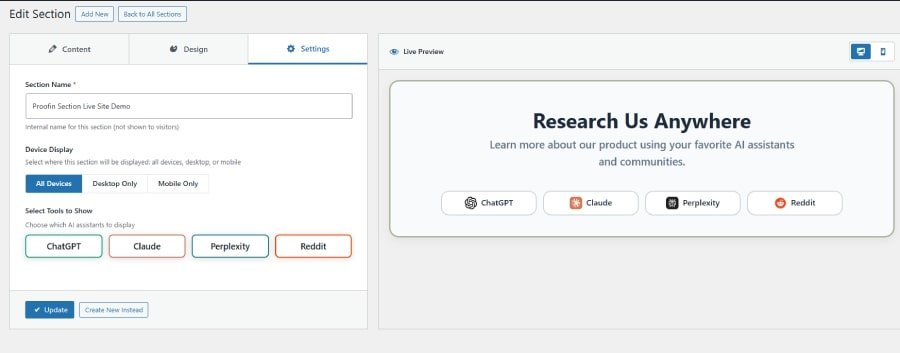
Step 2: Create a new research section with your desired heading and description.
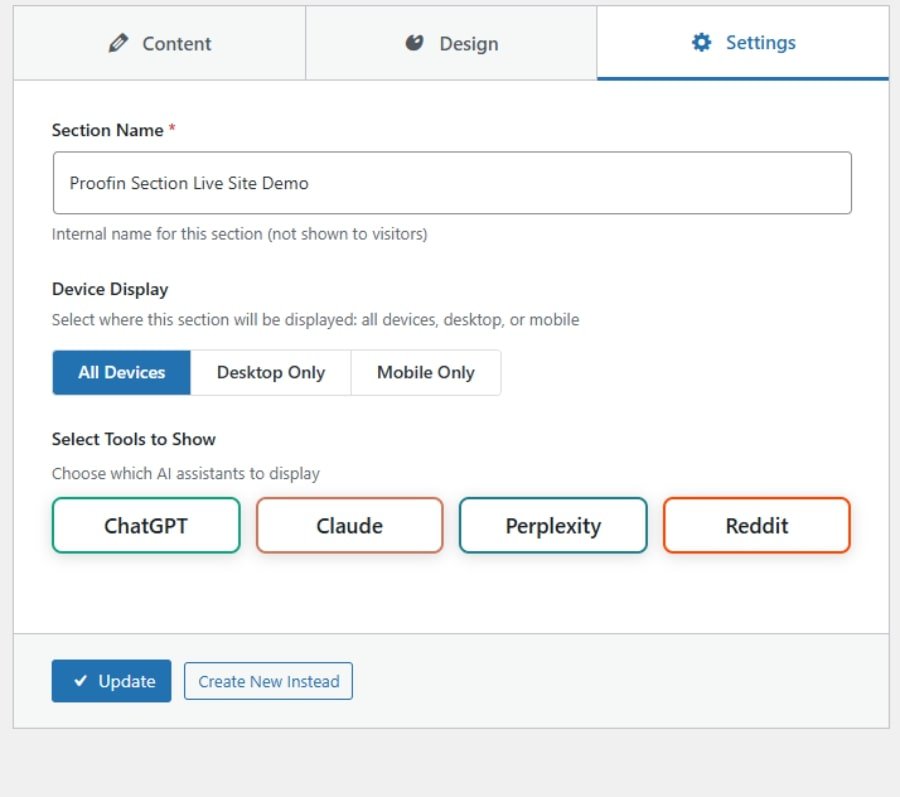
Step 3: Choose the AI platforms (ChatGPT, Claude, Perplexity, Reddit) and customize the prompts for each.
Step 4: Select the display options (desktop-only, mobile-only, or all devices).
Customizing WP Proofin
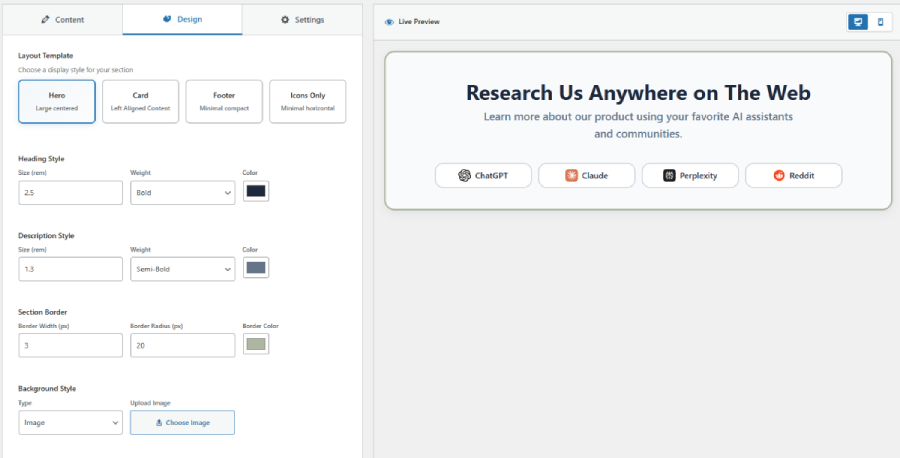
Step 1: In the Design tab, choose your layout (Hero, Card, Footer, or Icons Only).
Step 2: Customize the section’s appearance (fonts, colors, borders).
Step 3: Add background images or choose solid colors to match your branding.
Step 4: Preview the changes in desktop and mobile view before publishing.
Live Brand Research with WP Proofin
Proofin brings your brand to life on your site, allowing users to instantly explore your brand through AI tools (ChatGPT, Claude, Perplexity) or Reddit. Fully customizable prompts, layouts, and device visibility options make it easy to tailor the experience, enhancing user engagement and showcasing your brand across multiple platforms.
Research Us Anywhere on The Web
Learn more about our product using your favorite AI assistants and communities.
Explore Proofin's Features
Fully Customizable Design Options
Proofin provides extensive design customization, allowing you to adjust the appearance of your AI-powered branding features. You can modify heading styles, background images, text colors, and layout formats to match your website’s theme. Whether you choose a clean hero layout or a compact footer, Proofin ensures seamless integration with your existing design.
Easy Activation & Deactivation of Sections
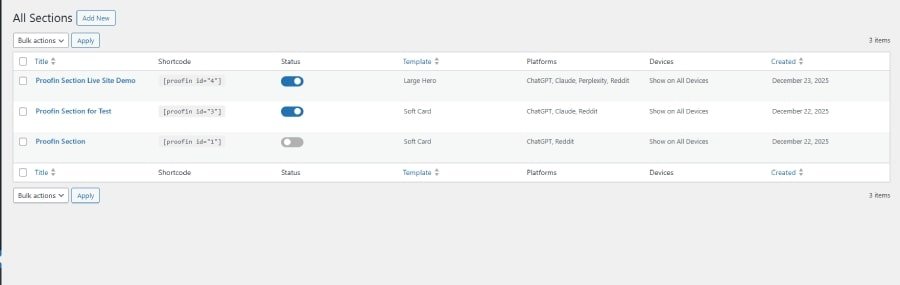
Proofin allows you to easily manage the visibility of each section. Activate or deactivate sections with a simple toggle switch. This flexibility enables you to show or hide the AI-powered research tools on specific pages or devices, giving you full control over how and when your visitors interact with your brand.
Integrate Multiple AI Tools & Platforms
Proofin integrates seamlessly with four of the most popular AI platforms: ChatGPT, Claude, Perplexity, and Reddit. Customize which platforms to display for your visitors, offering them a tailored experience based on their preferred research method. Whether your users choose AI chat or social media, Proofin provides accurate and relevant insights about your brand.
Section Positioning
Proofin gives you full control over where your sections appear. Choose from options like showing on all devices, desktop-only, or mobile-only. Whether you want a sleek footer on mobile or a comprehensive hero section on desktop, Proofin ensures optimal display across all device types.
Get in Touch with Proofin!
We’d love to hear from you! Whether you have a question, need support, or want to learn more about Proofin, our team is ready to assist you. Reach out, and we’ll get back to you as soon as possible.
Contact Us
FAQs
How do I install Proofin?
We’d love to hear from you! Whether you have a question, need support, or want to learn more about Proofin, our team is ready to assist you. Reach out, and we’ll get back to you as soon as possible.
Can I customize Proofin’s appearance on my site?
We’d love to hear from you! Whether you have a question, need support, or want to learn more about Proofin, our team is ready to assist you. Reach out, and we’ll get back to you as soon as possible.
How can I enable or disable Proofin on specific devices?
We’d love to hear from you! Whether you have a question, need support, or want to learn more about Proofin, our team is ready to assist you. Reach out, and we’ll get back to you as soon as possible.
Can I customize the prompts for the AI models?
We’d love to hear from you! Whether you have a question, need support, or want to learn more about Proofin, our team is ready to assist you. Reach out, and we’ll get back to you as soon as possible.
How do I deactivate Proofin if needed?
We’d love to hear from you! Whether you have a question, need support, or want to learn more about Proofin, our team is ready to assist you. Reach out, and we’ll get back to you as soon as possible.
Is Proofin compatible with other plugins?
We’d love to hear from you! Whether you have a question, need support, or want to learn more about Proofin, our team is ready to assist you. Reach out, and we’ll get back to you as soon as possible.